Add an installed app
Choose an app or drag its bundle into Faraday. Only explicitly selected applications become caged.
Mac app firewall · Private beta
Faraday Cage is a privacy-first, per-app outbound firewall for macOS. Pick an app, put it in the Cage, then choose what gets out.
Deny by default / Ask when supported / Allow by rule
Development build. Apple capability approval and signed runtime acceptance are still in progress.
Download
The public Developer ID build is not available yet. Join the early-access list and we will send one release email when the signed build has cleared system-extension, reboot, and real-network acceptance.
Join private betaHow it works
Faraday starts with an explicit user choice. It does not make every application ask for permission; you choose which app belongs inside a Cage.
Choose an app or drag its bundle into Faraday. Only explicitly selected applications become caged.
Start with Deny, use supported Ask prompts, or allow by default while keeping specific block rules.
The development architecture admits the app by signed process identity and is designed to attribute its descendants.
Review destinations and create app, host, endpoint, path, or method rules from the network evidence you actually observed.
Real product UI
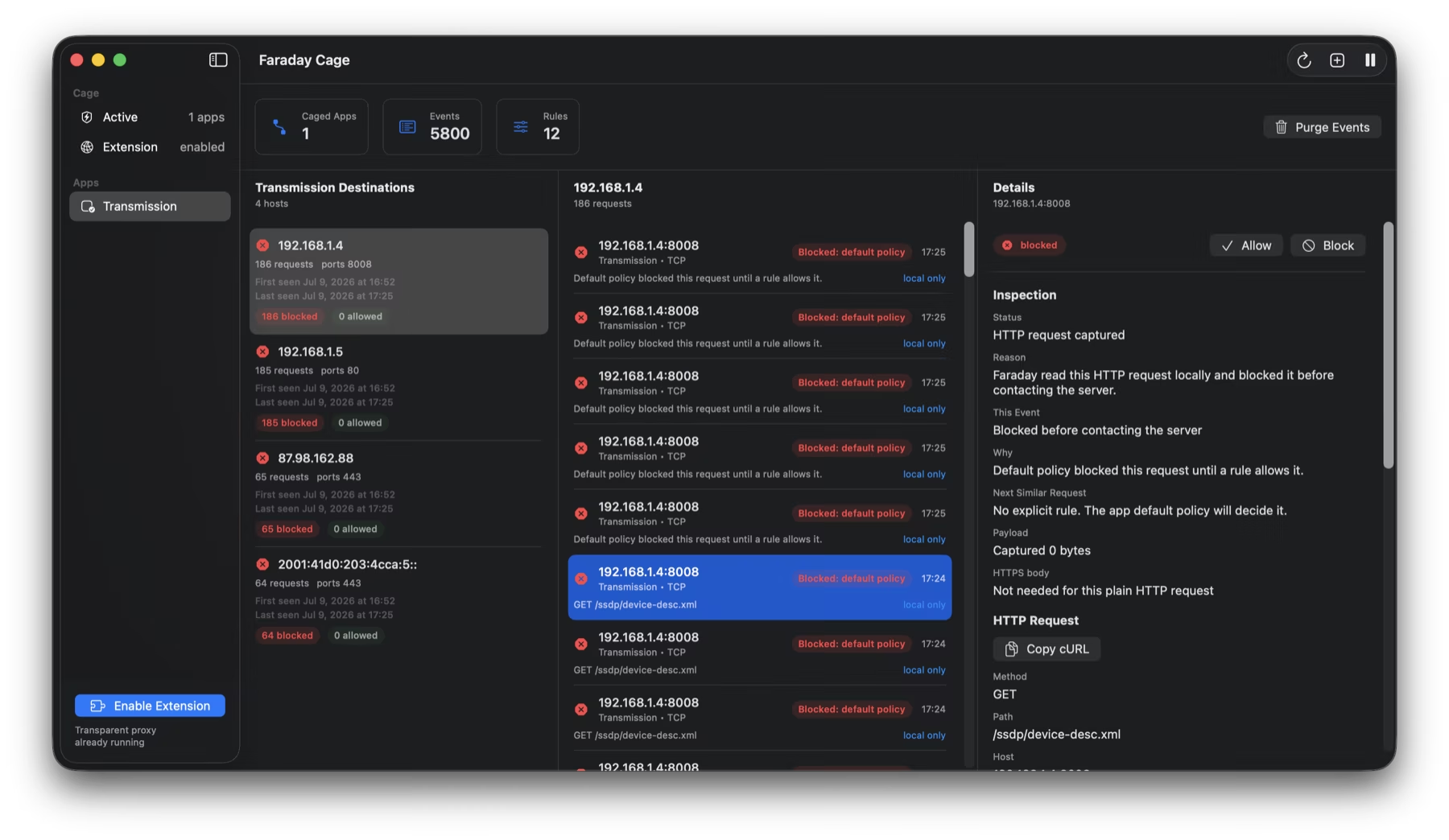
These are real development-build screenshots, not generated App Store mockups. The current guard-plane build is still undergoing signed runtime validation.
Destinations, request decisions, and the next matching policy stay together in one local view.
Allow or block a method and path, a path, an endpoint, or a host instead of making a vague all-or-nothing choice.
Filter global and app-specific rules by decision and layer. No account or cloud console is required.
Why Faraday
The most important design choice is not another graph. It is a narrow data boundary: observe the selected app locally, make the policy legible, and do not create new network traffic to enrich it.
Faraday begins with the apps you explicitly choose. Everything else stays outside that policy unless you add it.
The guard architecture tracks audit-token identities across exec, fork, and exit so helper-process attribution can be validated without trusting a reused PID.
Signed runtime validation pendingFaraday UI, core services, helper, process monitor, and content filter do not initiate DNS, TCP, or UDP to explain the traffic they observe.
The current guard-plane design requires fresh agreement between its protection components before reporting a Cage as protected.
Boot acceptance pendingPractical Mac firewall guides
Each guide gives the direct macOS answer first, then shows where a per-app firewall fits. No keyword-stuffed filler and no pretending Faraday is the only option.
Keep Wi-Fi on while one selected app stays offline.
Built-in firewallWhat Apple’s firewall covers and where outbound control differs.
Network visibilityFrom Activity Monitor totals to app-level destinations and decisions.
Privacy workflowSeparate necessary services from analytics, ads, and background noise.
Product comparisonA fair comparison of Little Snitch, LuLu, Radio Silence, and Faraday.
Focused workflowUseful for offline testing, local tools, and untrusted software.
Privacy architectureA practical checklist for telemetry, enrichment, storage, and trust.
Guide libraryAll how-tos, comparisons, privacy notes, and related questions.
Private betaRequest early access to the signed Mac build.
Mac app firewall FAQ
Each answer maps to a specific search question and links to the complete explanation instead of hiding the useful part in an accordion.
Yes. A per-app outbound firewall can deny connections for one selected application while Safari, Mail, and the rest of your Mac remain online.
Learn more about blocking one Mac app →Apple documents its built-in firewall around protecting the Mac from network access and managing incoming connections. That is different from deciding which remote services an app may contact.
Learn more about incoming vs outgoing firewalls →Activity Monitor shows per-process byte totals. A per-app network monitor can add destinations, timestamps, transport, decisions, and retained history for the app you are investigating.
Learn more about app network activity →It means the app contacts a developer, analytics, advertising, update, licensing, or another remote service—often in the background. The phrase does not prove the connection is malicious.
Learn more about phoning-home connections →No. Faraday Cage is a local application firewall. It does not provide a remote VPN exit, change your public location, or upload activity to a hosted account.
Learn more about local-only firewall privacy →The development build implements interactive Ask for supported TCP requests. UDP, DNS, and QUIC cannot wait on the same prompt; they are denied unless a persistent allow rule matches.
Learn more about policy behavior →No. Its UI, core services, menu helper, process monitor, and content filter do not initiate network connections for telemetry, analytics, enrichment, or update checks.
Learn more about the passive-observation boundary →Faraday focuses on an explicit Cage for selected apps and local process-family attribution. Other products may be a better fit for whole-Mac alerting, open-source use, or a minimal blocklist.
Compare Mac app firewalls →Join the private beta list. One email when the signed build is ready—no newsletter, pixels, or marketing telemetry.
Request early access